Dutch Flags Shapes Clipart for Canva: 19 Ready-to-Use Elements
When you are working on a project that requires national symbols, finding the right asset can often feel like a scavenger hunt through generic stock sites. You usually end up with rigid JPEGs that don't scale well or vectors that require complex software to edit. This is exactly the friction point I wanted to solve when creating the Dutch Flags Shapes Clipart for Canva. The goal was to provide a set of design assets that aren't just images, but functional building blocks for your creative workflow.
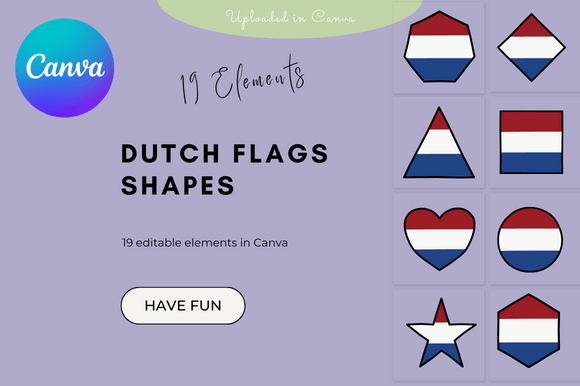
What we have here is a curated collection of 19 distinct elements. These aren't just static rectangles; they are versatile shapes featuring the iconic red, white, and blue tricolor of the Netherlands. We are talking about waving flags, geometric interpretations, pennants, and badges. Because these are uploaded directly into Canva as a template file, you get the best of both worlds: the quality of professional design assets with the accessibility of a drag-and-drop editor. You don't need to be a Photoshop wizard to use them effectively.
Visual Characteristics and Versatility
The personality of this clipart set leans heavily into versatility. Visually, the elements maintain a clean, modern aesthetic that fits well with current design trends. We aren't looking at overly textured, vintage stamps here (unless you edit them that way). The shapes are crisp, ensuring that whether you are working on a massive banner or a small social media icon, the edges remain sharp. The color palette uses standard hex codes for the Dutch flag, but the real value lies in the fact that you can edit them directly in Canva. If you need to adjust the saturation of the red or add a specific overlay, the power is in your hands.
This flexibility makes the Dutch Flags Shapes Clipart for Canva an essential piece of a modern digital toolkit. In the past, using clipart was often seen as a shortcut that looked "cheap." However, with the rise of flat design and geometric branding, shapes have become a staple in high-end graphic design. These elements work because they are simple. They provide a strong visual anchor without overwhelming the rest of your typography or imagery.
Real-World Applications for Creators and Brands
Let’s talk about where these assets actually fit into your projects. If you are a content creator or marketer, timing is everything. When King's Day rolls around, or if you are covering a sporting event, you need assets immediately. Having these pre-loaded into Canva means you can whip up social media graphics in minutes. Imagine creating an Instagram Story or a Facebook banner; you can simply drag a waving flag shape into your composition, pair it with a bold sans serif font, and you have a professional announcement ready to go.
For entrepreneurs and small business owners, particularly those in the travel niche, e-commerce, or expat services, brand consistency is key. You might use these shapes in your packaging design to denote origin or in your web design elements to create a sense of place. For example, a travel blogger could use these shapes as bullet points or sidebar decorations to categorize posts about the Netherlands. It adds a layer of thematic cohesion that generic dots or squares simply cannot provide.
Educational and Commercial Use Cases
The utility extends heavily into the educational sector. Teachers and classroom organizers often need to create worksheets, certificates, or party decorations. The fact that this set is licensed for school, classroom, or commercial use removes the headache of copyright worries. You can create printable bunting for a geography lesson or digital badges for student achievements without checking the fine print on every single file.
Furthermore, for those running a commercial operation, these assets can be integrated into logo design concepts or merchandise. If you are selling t-shirts, mugs, or stickers on platforms like Etsy or Redbubble, these shapes serve as excellent starting points. You can combine them with a script font or a handwritten font to create a "Netherlands 2024" souvenir design that feels personalized and high-quality.
Design Strategy: Integrating Clipart with Typography
A common mistake with clipart is letting it clash with the text. When using the Dutch Flags Shapes Clipart for Canva, think about visual hierarchy. If the flag shape is large and detailed, your typography should probably be a cleaner, more understated serif font or sans serif font. If the flag shape is a simple, small icon, you can afford to use a more expressive display font for your headlines.
Consider the mood you are setting. The Dutch aesthetic is often associated with clean lines and functional beauty (think De Stijl). To honor that in your editorial design or layout, try pairing these flag elements with a geometric typeface. This creates a sense of intentionality. It tells the viewer that you didn't just slap an image on the page; you curated a design system. This is how you move from "hobbyist" to "professional" in your visual output.
Maximizing Your Canva Workflow
Since the purchase provides a direct download link to a Canva template, the workflow is streamlined. Once you open the link, the elements are saved to your "Uploads" or "Projects" folder. From there, the world is your oyster. You can change colors to match a client's specific brand identity, crop them into circles for profile pictures, or use them as masks for photos.
One practical tip: Don't be afraid to layer these shapes. Place a flag element behind a semi-transparent text box to create depth, or stack multiple shapes to create a collage effect. Because they are vector-based shapes within Canva, they won't pixelate no matter how much you scale them up for print materials like posters or flyers.
Final Thoughts on Utility
Ultimately, the value of the Dutch Flags Shapes Clipart for Canva lies in its ability to save you time while elevating your design quality. It bridges the gap between needing a specific visual element and having the technical skill to create one from scratch. Whether you are a publisher working on a travel guide, a hobbyist scrapbooking a vacation, or a brand strategist building out a campaign, these 19 elements offer a practical, stylish, and legally safe solution for your Dutch-themed design needs. It’s about having the right tools at the right time, ready to be customized exactly the way you need them.