Transform Your Content with This 30-Page Canva eBook Template
You have a story to tell, a course to complement, or a powerful lead magnet to build. The challenge isn't the content—it's the packaging. Creating a professional, visually cohesive eBook from scratch is a significant time investment, often requiring design software and skills you might not have. That's where a thoughtfully designed 30-pages EBook Template for Canva changes the game. It’s not just a collection of pages; it’s a structured system designed to translate your expertise into a polished, engaging digital publication with remarkable speed.
A Blueprint for Professional Publishing
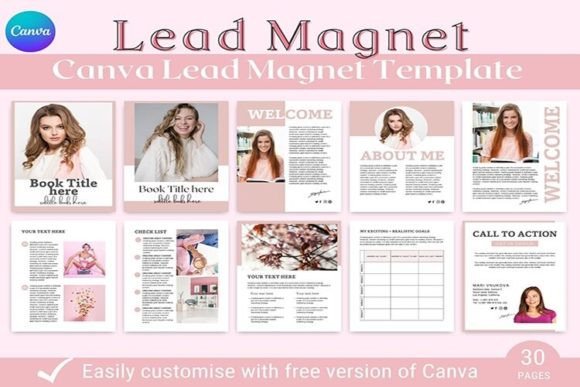
Think of this template as the architectural blueprint for your next digital project. It provides the foundational structure so you can focus entirely on your message. The package includes 30 meticulously organized pages, ensuring you have a layout for every need. You begin with two distinct cover page variations, allowing you to choose the first impression that best matches your brand's personality—whether it's bold and graphic or clean and minimalist. From there, two table of contents templates set the stage, offering clear navigation for your reader.
The heart of the eBook lies in its versatile content pages. With 15 content layouts, you can mix and match styles to present your information dynamically. These pages are crafted with strong visual hierarchy in mind, using ample white space, clean typography, and balanced compositions to guide the eye naturally. Whether you're sharing step-by-step tutorials, showcasing portfolio images, presenting data with simple infographics, or writing long-form insights, there's a layout to support it without feeling cramped or cluttered. The three chapter pages provide clear section breaks, while the two welcome pages and two "About the Author" templates add essential personality and credibility, turning a document into a branded experience.
Designed for Real-World Creators
This isn't a theoretical design exercise; it's a practical tool built for people who make things. Bloggers can compile a series of popular posts into a comprehensive guide. Course creators can develop a supplementary workbook that enhances their curriculum, providing tangible value that students can reference offline. For marketers and entrepreneurs, it’s an ideal framework for a lead magnet—a substantial piece of content that demonstrates expertise and encourages email list sign-ups. The call-to-action pages are strategically placed to drive that next step, whether it's visiting a website, joining a community, or exploring a product.
The style of the template leans into modern typography and clean, contemporary design. It avoids overly decorative fonts or complex graphics that can distract from your content. Instead, it uses a balanced mix of sans serif fonts for clarity and readability, with potential accent styles for headings to create interest. This approach ensures your content remains the star, while the overall brand identity feels professional and trustworthy. The US Letter (8.5″ by 11″) size is a standard, versatile dimension that works perfectly for digital distribution, screen reading, and even home printing.
Practical Guidance for Customization
Adapting the template to your unique voice is straightforward in Canva. Start by uploading your brand's color palette and logo design assets. Swap out placeholder text with your own, but pay close attention to maintaining the established typographic hierarchy. Keep heading sizes consistent, use paragraph text for body copy, and leverage the bold or italic styles provided for emphasis. This consistency is what separates a disjointed document from a cohesive publication.
When it comes to font pairing, the template often comes pre-set with a harmonious combination. If you choose to modify it, a safe rule is to pair a clean sans serif font for body text with a complementary serif font or a subtle display font for headings. Avoid using more than two font families to maintain visual unity. Always test your text at various sizes to ensure readability across devices, especially on mobile screens where many will view your PDF.
Remember, the goal is to create a seamless experience. Use the "About the Author" page to build a personal connection, and let the welcome pages set the tone for the journey ahead. The included call-to-action designs are your closers—make them clear, compelling, and aligned with your primary objective. This 30-pages EBook Template for Canva is more than a design asset; it's a launchpad. It handles the heavy lifting of layout and design consistency, freeing you to pour your energy into the creative work that truly matters—your content.